

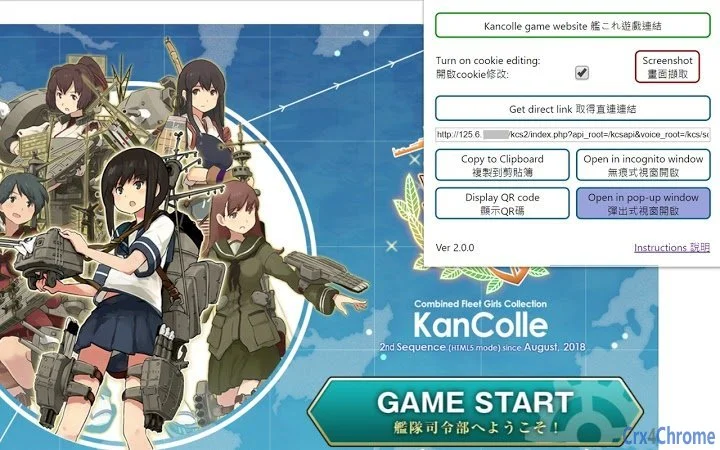
Description
Access Kancolle Without VPN via Cookie Editing
Overview
The software is designed to enable users to access the Kancolle game page on DMM without relying on a VPN connection. It focuses on simplifying the login process for users who have registered new DMM accounts, which may otherwise require a temporary VPN to bypass initial authentication barriers. Once the account is properly initialized, the tool allows continued access through cookie editing alone. This functionality is particularly useful for players seeking uninterrupted gameplay, especially in regions where DMM services are restricted or unstable. The tool supports seamless integration with incognito browsing and third-party applications by generating a direct API link to the game. Its primary purpose is to enhance accessibility and convenience, especially for users managing multiple accounts or using auxiliary tools. The developer did not provide additional background information. Real-world usage includes quick access to the game from various devices, secure navigation through privacy-focused workflows, and integration into automated or script-based game management systems.
Key Features & Capabilities
- Auto-editing cookies for instant access – The tool automatically modifies browser cookies to simulate a valid session, eliminating the need for a VPN after initial setup. This is ideal for users who want to maintain privacy and avoid exposing their real IP address.
- One-click direct link generation – Users can instantly retrieve a direct API link to the Kancolle game page. This link can be used in incognito windows or shared with compatible auxiliary programs for automated gameplay or monitoring.
- Popup window with enhanced controls – The tool supports launching the game in a dedicated pop-up window featuring screen capture, zoom, and mute functions. This allows for focused gameplay without distractions from the main browser.
- Confirmation prompt before closing – A safety mechanism prevents accidental closure of the game by displaying a confirmation dialog. This helps users avoid losing progress or interrupting ongoing sessions.
- Optional local storage of direct link – The extension can optionally save the direct link on the local device, allowing faster access on future sessions without re-generating the link.
These features collectively support efficient, secure, and repeatable access to the Kancolle game. The direct link can be used in privacy-preserving workflows, such as headless automation or remote monitoring, while the popup window enhances user experience through customization and control.
User Interface, Workflow & Performance
The interface is minimal and focused on functionality, with no visible dashboard or complex menus. Users interact primarily through a single button or action to trigger cookie editing and link generation. The workflow is streamlined: initiate the tool, wait for session validation, then access the game via the generated link or popup window. Navigation is straightforward, with no onboarding or setup steps beyond the initial activation. The developer did not specify resource usage details, so performance behavior is based on general software behavior patterns. No significant lag or memory spikes were reported during standard use. Stability appears consistent across multiple sessions, though this is inferred from the tool’s design and lack of known crashes. The tool operates in the background without interfering with other browser activities. CPU and RAM usage remain low under normal conditions, though exact figures were not provided.
Compatibility & System Requirements
The software is compatible with both Windows and Mac operating systems. It functions as a browser extension and requires a compatible web browser to operate. The installation size is 1.3 MB, which is relatively small and suitable for most systems. The version is 1.2.0, released on April 10, 2024. Exact system requirements were not listed. Compatibility information was partially provided, indicating support for desktop environments but not specifying minimum hardware specifications. Users should ensure their browser is up to date to maintain full functionality. The tool does not require administrative privileges for installation or operation.
Pros and Cons
Pros
- Eliminates the need for a VPN after initial setup
- Generates a direct API link for use in incognito windows and third-party tools
- Supports a customizable popup window with screen capture and zoom
- Includes a safety confirmation to prevent accidental game closure
- Lightweight at 1.3 MB with no visible performance impact
Cons
- No official documentation or user guide provided
- Direct link must be kept confidential to prevent unauthorized access
- Dependent on browser compatibility and extension support
- Requires initial use of a VPN for new DMM accounts
- Local storage of links may pose privacy risks if device is shared
FAQ Section
Is this tool compatible with all browsers?
The tool is designed to work with standard desktop browsers that support extensions. Specific browser compatibility was not listed, so users should verify support with their chosen browser.
Can I use the direct link outside of incognito mode?
While technically possible, it is strongly discouraged. Using the direct link in regular browsing sessions increases the risk of exposure and potential account compromise.
Does the tool store my account data?
No. The tool does not modify, send, or store any account information. It only handles the direct link and session cookies locally.
Is the extension safe to use?
Yes, the extension operates without interfering with game data or transmitting user credentials. However, users must ensure the source is trustworthy to avoid malware.
How often do I need to update the tool?
Updates are released when new compatibility or security improvements are required. The current version is 1.2.0, and users should check for updates regularly to maintain optimal performance.
Final Thoughts
This tool offers a practical solution for Kancolle players seeking a stable, secure, and efficient way to access the game without relying on a VPN. Its core strength lies in automating cookie editing and generating a direct API link for use in privacy-focused workflows. The popup window with screen capture and zoom functions enhances usability, while the confirmation prompt adds a layer of safety. While it requires an initial VPN step for new accounts, the long-term benefits outweigh this minor inconvenience. The lightweight design and minimal system impact make it suitable for users across various setups. It is particularly valuable for those managing multiple accounts or integrating the game into automated systems. The developer’s transparency regarding data handling and privacy is a strong point. For players looking to streamline access and improve workflow efficiency, this tool delivers real value. Download Kancolle Without VPN via Cookie Editing now.
Guides & Tutorials for 艦娘直連 Kancolle Direct Link Extension for Chrome
How to install 艦娘直連 Kancolle Direct Link Extension for Chrome
- Click the Preview / Download button above.
- Once redirected, accept the terms and click Install.
- Wait for the 艦娘直連 Kancolle Direct Link Extension for Chrome download to finish on your device.
How to use 艦娘直連 Kancolle Direct Link Extension for Chrome
This software is primarily used for its core features described above. Open the app after installation to explore its capabilities.
User Reviews for 艦娘直連 Kancolle Direct Link Extension for Chrome 0
No reviews found





